
想用 AI 卻不知道從哪裡開始?上班的時候被大量瑣碎事務淹沒,從每天被分散在 Slack、email 和無數會議記錄中的專案更新;再到消化長達數頁的 SOP 文件,這些手動任務不僅耗時,也成為生產力的主要瓶頸。
《經理人》整理 Claude 官方提供的範例,協助使用者了解如何將 AI 應用於日常生活工作。本文將解析 5 個真實的專業工作場景,並提供完整的中英對照提示詞,展示如何將 AI 轉化為真正強大的生產力夥伴。
快速準備你的一周規畫
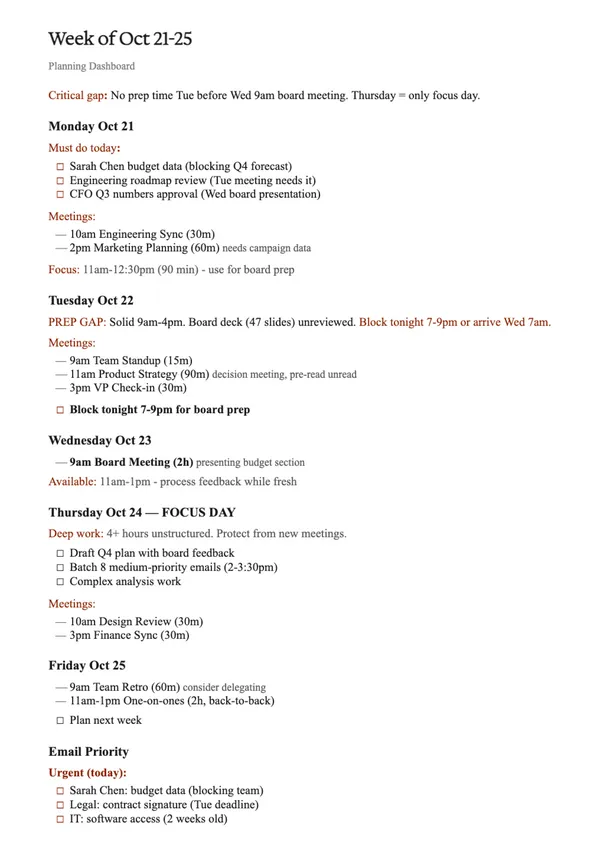
規劃一周的工作內容通常意味著要打開行事曆、瀏覽收件匣,可能還要檢查一些文件,然後試著在腦海中整合哪些會議需要準備、什麼事情緊急,以及如何分配時間。
Claude 可以同時閱讀行事曆和收件匣,分析不同平台切換時可能遺漏的關聯性,例如發現周三有董事會議,但周二卻完全沒有空檔準備那份 47 頁的簡報,AI 會主動標示出這個「準備缺口」(PREP GAP),並建議你處理;或是從 11 封待辦 email 中篩選出 3 封「今天必須回覆」的緊急信件,如法務合約簽署(周二截止)和 IT 軟體權限(已延遲 2 周)。
首先要告訴 AI 需分析哪些日期、在哪裡搜尋,以及輸出的文件格式。
-
分析我下周(10 月 21 日至 25 日)的 Outlook 行事曆,找出所有會議、需要專注工作的時段,以及任何我需要立即處理的排程問題。
接著,從我的 Outlook 收件匣中,總結我周末需要處理的任何郵件、上周被忽略但在本周會變得很緊急的討論串,以及任何正被我卡住、等待我回應的人 。
幫我創建一份概覽文件,內容包含我的『必做事項』、每日行程結構、我仍需進行的準備工作、我需要用來深度工作的時段,以及高優先級和可延後處理的郵件分類 。 -
Help me plan my upcoming week: October 27-31.
Using my M365 connector look at my Outlook calendar and find all meetings that need prep, or where I'm making decisions. Show me where I'm overbooked, where I have real focus time, and any scheduling problems I need to fix now.
From my Outlook inbox and summarize any weekend emails I need to handle, any threads from last week that become urgent this week if ignored, and anyone blocked waiting for my response.
Create an overview document of my must-dos, daily structure, preparation I still need to do, blocks of time I need for deep work, and email triage of high-priority vs can-wait.
為了幫助 Claude 有效分析一周,需要授權 Claude 存取工作空間,使用 Microsoft 365 連接器,可以讓 Claude 存取 Outlook 行事曆、email、SharePoint 文件、雲端檔案和 Teams 對話。
2.在設定(Settings) > 連接器(Connectors)中,可以找到其他平台的連接器。


Claude 會同時閱讀所有資料來源,分析重要事項,並向工作者展示如何為即將到來的一周做好準備。
生成專案狀態報告
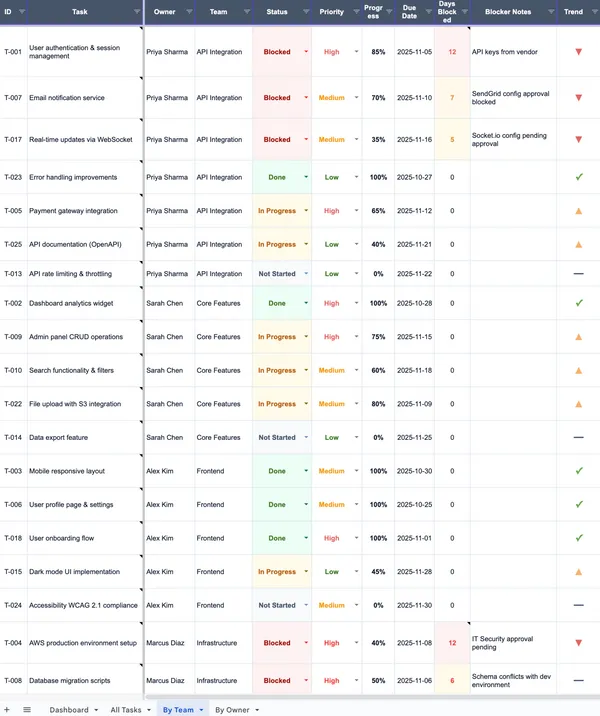
傳統專案報告需要手動從 Slack、Gmail 和 Google 雲端中確認更新事項,過程繁瑣又容易出錯。AI 可以同時查詢這些分散的來源,並自動生成一份 Excel 追蹤表 。
AI 不只是複製貼上,它還辨識矛盾的資訊,例如當它在 Slack 看到開發者 Sarah 說「80% 完成」,但在一對一的會議記錄中看到「待確認」,AI 會自動在追蹤表上將進度調整為 45%,也能從 Slack 訊息中發現某人已被「卡住 4 天」。
-
請搜尋我過去 2 周在以下來源中關於『Project Hermes』的資訊:Gmail (搜尋 "Project Hermes") 、Slack #hermes-sprint 頻道、Google Drive "Project Hermes 資料夾、近期的行事曆會議。
針對每項任務,我需要看到:
•誰負責以及他們正在做什麼
•目前狀態(未開始、進行中、被卡住、已完成)
•任何阻礙,以及被卡住了多久
•他們在更新中提到的計畫與挑戰
創建一個 Excel 追蹤表,並包含這些功能:視覺化狀態指標、帶有來源上下文的儲存格註解(讓我能懸停查看細節)、狀態和優先級的下拉式選單(以便於更新),以及視覺化顯示進度的資料橫條。
這份追蹤表必須能讓人一眼就看出問題在哪裡、誰需要幫助。 -
I need to consolidate project status from multiple sources into a task tracker.
Pull information from:
• Gmail (past 2 weeks, search "Project Hermes")
• Slack #hermes-sprint channel
• Google Drive "Project Hermes" folder
• Recent calendar meetings
For each task, I need to see:
• Who owns it and what they're working on
• Current status (not started, in progress, blocked, done)
• Any blockers and how long they've been stuck
• Notes from their updates about plans and challenges
Create an Excel tracker and include these features: visual status indicators, cell comments with context from sources (so I can hover and see the details), dropdown menus for status and priority (to make updates easy), and data bars showing progress visually. The tracker should make it obvious at a glance where the problems are and who needs help.
最終能產出一份包含視覺化指標、進度橫條,甚至包含儲存格註解的 Excel 報告。
創建流程圖
企業內部有許多 SOP 文件,例如一份 42 頁的軟體導入手冊,內容密集且難以遵循。AI 能夠將這種「密集的文件」轉換為「視覺圖表」,幫助團隊理解複雜系統。
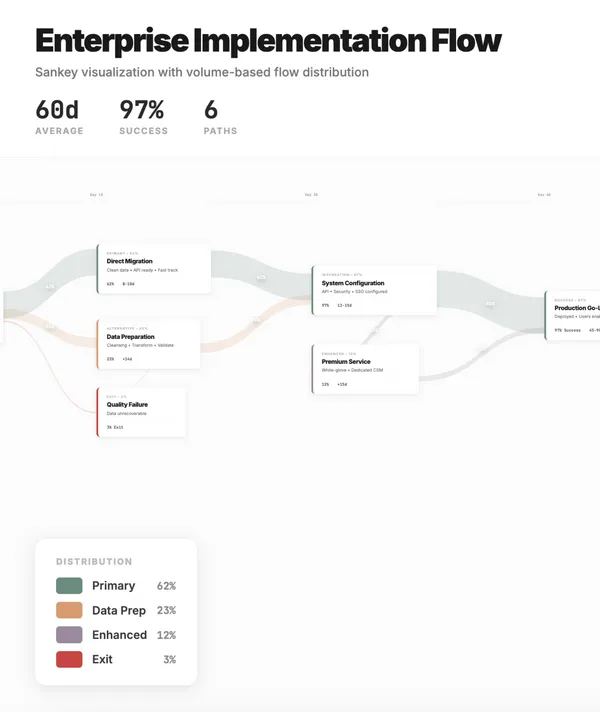
透過精確的提示詞,AI 能生成「Sankey 流程圖」(Sankey flow diagram)。這種圖表不僅能顯示路徑,還能用線條的寬度顯示流量分佈,例如 AI 能從文件中分析出,62% 客戶的主要路徑,23% 客戶的替代路徑,讓流量分佈一目了然。
-
我正在上傳我們 42 頁的企業軟體實施手冊 ,裡面全是客戶上線流程。我需要一個能讓團隊一目了然的系統視圖,並理解客戶流量如何在不同路徑中分佈。
請用『有機的曲線路徑』(organic curved paths)創建一個 Sankey 流程圖 。讓它看起來值得截圖分享,使用專業、粗體的字體和自然的調色板。
啟用互動式的縮放和平移功能,並使用流暢的貝茲曲線(Bezier curves) 。應用 Tufte 等級的資訊設計原則。 -
I'm uploading our enterprise software implementation playbook—42 pages of customer onboarding procedures that... I need a single view of the system and understand how customer volume distributes across the different paths.
Create a Sankey flow diagram with organic curved paths. Make it screenshot-worthy with professional, bold typography and a natural color palette.
Enable interactive zoom and pan with smooth Bezier curves. Apply Tufte-level information design.
AI 會分析上傳的流程文件,並轉換為互動式流程圖,以視覺化呈現實施路徑和各路徑的流量分布。每個實施階段都會變成可點擊的卡片,並顯示詳細內容。
將 email 變成活動追蹤器
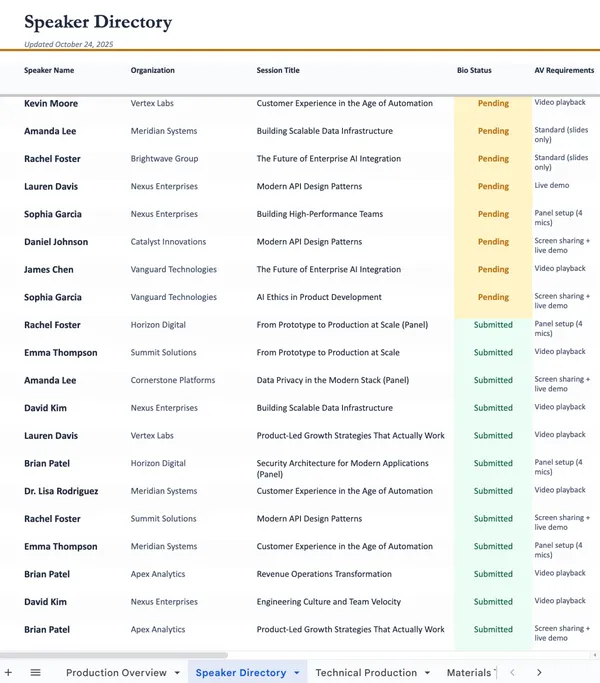
辦理大型活動時,統籌者必須從無數郵件中手動撈取演講者的確認函、A/V 設備需求、演講主題和個人簡介。這個範例展示 AI 如何直接掃描 Gmail 收件匣,從 38 封確認信中提取所有關鍵物流資訊,並自動生成一個結構化的 Excel 追蹤表。
-
搜尋我的 Gmail 中的演講者確認信,並提取他們的姓名、公司、他們確認的議程主題、提及的時間偏好、A / V 需求、他們是否提到旅行安排,以及他們是否已發送個人簡介和大頭照 。我們下週要鎖定議程。
幫我建立一個包含公式、顏色編碼儲存格和清晰區塊的追蹤器。
讓這份試算表看起來像是由精品設計工作室創作的數據視覺化作品,而不是像填寫 Excel 模板。排版和顏色應具備編輯性、精緻感與現代專業性。
包含專業的試算表元素,如凍結窗格、可排序的欄位和可運作的公式。 -
Search my Gmail for speaker confirmations and extract their name and company, what session topic they confirmed, time preference if mentioned, A/V needs, travel arrangements if they brought it up, whether they've sent their bio and headshot... We're locking in the agenda next week.
Build me a tracker with formulas, color-coded cells, and clear sections.
Make the spreadsheet look like a boutique design studio created a data visualization piece, not like someone filled out an Excel template. The typography and color should look editorial and refined with modern professionalism.
Include professional spreadsheet elements like frozen headers, sortable columns, and working formulas.
這份由 AI 產出的報表甚至能自動分析與分類:例如 8 場會議需要複雜的 A / V 設備,如現場演示或影片播放,以及 11 位講者還沒繳交個人簡介與大頭照,讓活動團隊能立即針對高風險項目進行後續追蹤。
修訂合約與談判
這個範例模擬一家「預算有限的 B 輪新創公司」正在審查一份供應商服務協議。AI 的任務是像法務團隊一樣閱讀合約,找出風險並提出保護性修改建議。
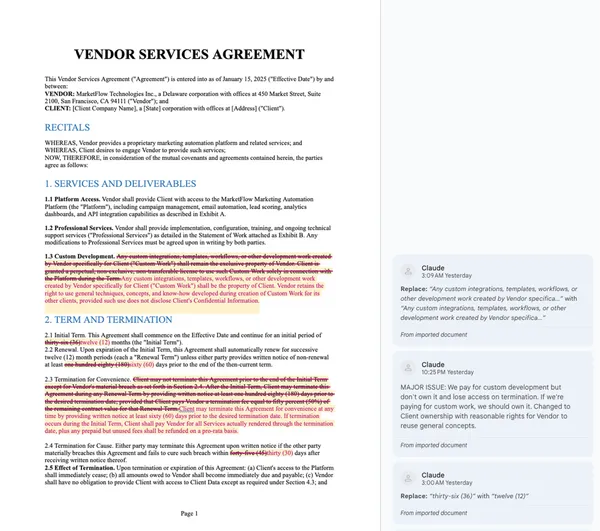
AI 可以產出策略性修改,並抓出多個重大問題,例如原合約中嚴苛的「自動續約」條款、無限的賠償責任,以及最關鍵的「客製化開發成果」的所有權竟歸屬供應商,而非付錢的客戶。
-
我正在審查一份行銷自動化平台的供應商服務協議。我們是一家 B 輪新創公司,預算彈性有限。
請創建一個「紅線標記版本」(redlined version),保護我們免於被鎖定在無法退出的條款中,確保我們保留對所付費的任何客製化成果的所有權,並標記出任何隱藏費用或自動續約陷阱。
我需要一份可編輯的 Word 文件,其中包含『追蹤修訂』(紅色文字)。使用腳本在文件的邊緣為每處編輯創建真實的註解或建議,解釋該問題。
標記出任何可能在未來對我們不利的條款。 -
I'm reviewing a vendor services agreement for our marketing automation platform. We're a Series B startup with limited budget flexibility.
Create a redlined version that protects us from getting locked into something we can't get out of, ensures we keep ownership of our data and any work we pay for, and gives us flexibility to adjust or leave if things don't work out.
Create a new file that is an exact copy of the contract with track changes enabled. The redlines should show deletions (strikethrough red text) and insertions (underlined colored text). Use a script to create real comments or suggestions in the margins of the doc for each edit explaining the issue. Flag anything that could bite us later.
AI 不僅能找出問題,還能直接生成一份帶有「修訂追蹤」和「註解」的 Word 文件,清楚解釋為何要這樣修改。
AI 助理的價值不再僅僅是「回答問題」,而是「完成任務」。從自動化跨工具的資訊彙整、將非結構化資料轉為視覺化圖表,再到執行高風險的合約審查,成功的關鍵在於使用者能否提供清晰的「上下文」和精確的「指令」。對於現代工作者而言,學習如何撰寫「富含上下文的提示詞」,是最大化個人生產力的全新核心技能。
本文授權轉載自經理人月刊