AI 代理人(AI agent)已經對多數開發者不陌生,但一個常見糾結是:agent 用起來老是定不下來,其中的原因往往是 Skill 沒有被整理成清楚、可重複使用的模組。
當談到 SKILL.md 時,許多開發者往往過於執著於「格式」——反覆確認 YAML 是否正確、調整目錄結構、確保完全符合技術規範。但隨著越來越多的代理人工具(如 Claude Code、Gemini CLI、Cursor 等)的設計哲學都趨於一致,格式問題其實已經不再是核心障礙。
真正棘手的是「內容設計」。規範文件頂多告訴你怎麼「封裝」一個 Skill,卻沒有教你該如何設計 Skill 內部的邏輯與流程。
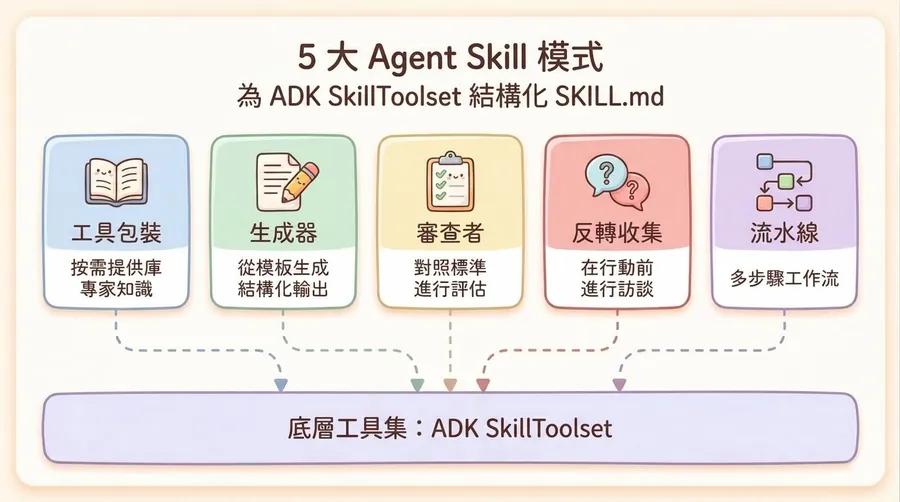
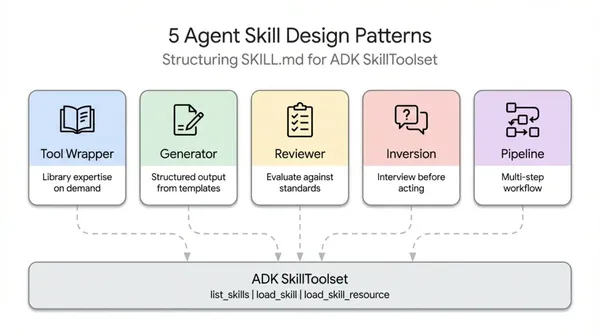
Google Cloud Tech 官方近日便整理出「5 大 Agent Skill 設計模式」,目標是提供一套可復用、可組合的模組化架構,讓 AI 代理人真正「聊得清楚、做得準確」。
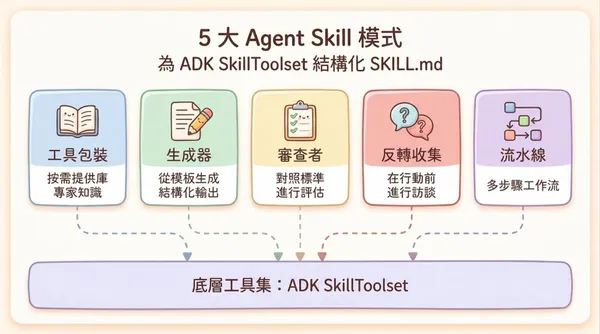
什麼是 Agent Skill?
Agent Skill 是一個自成一體的功能單位,透過一個名為 SKILL.md 的檔案決定如何觸發、該讀取哪些指令、該參考哪些範本。和把所有內容塞進系統提示詞(system prompt)相比,Skill 不僅讓 agent 只在需要時才載入相關上下文,更讓同一套技能封裝可設定給不同 agent 共用。
1. Tool Wrapper(工具包裝)
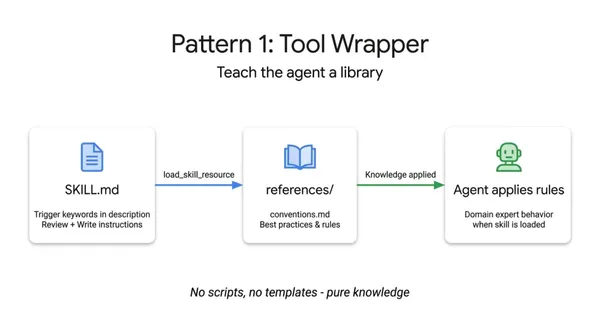
Tool Wrapper 的核心,是把特定服務或框架的使用規則封裝成一個獨立技能,讓 agent 在「真的需要」時才載入。這裡的服務可以是第三方 API(例如 Stripe API、Slack SDK),也可以是框架慣例(例如 FastAPI)。
Tool Wrapper 運作方式
在 Tool Wrapper 的 SKILL.md 裡,會明確寫出:
- 什麼時候啟用這個 Skill(例如在處理某個框架、某種 API 呼叫時)。
- 要從
references/載入哪些文件(例如內部最佳實務、錯誤處理規範)。 - 當 agent 在「寫程式碼」或「審查程式碼」時,必須把這些規則視為最高優先的準則來套用。
換句話說,Tool Wrapper 把原本會塞進系統提示詞的大量「操作說明」,拆出來放進可重複使用的技能模組
適合情境:適合用在 agent 需要跟多種 API 或特定框架互動、不想把每一種 API 說明與規範全部塞進單一系統提示詞的情境。
官方範例
# skills/api-expert/SKILL.md
---
name: api-expert
description: FastAPI development best practices and conventions. Use when building, reviewing, or debugging FastAPI applications, REST APIs, or Pydantic models.
metadata:
pattern: tool-wrapper
domain: fastapi
---

You are an expert in FastAPI development. Apply these conventions to the user's code or question.

## Core Conventions

Load 'references/conventions.md' for the complete list of FastAPI best practices.

## When Reviewing Code
1. Load the conventions reference
2. Check the user's code against each convention
3. For each violation, cite the specific rule and suggest the fix

## When Writing Code
1. Load the conventions reference
2. Follow every convention exactly
3. Add type annotations to all function signatures
4. Use Annotated style for dependency injection
2. Generator(生成器)
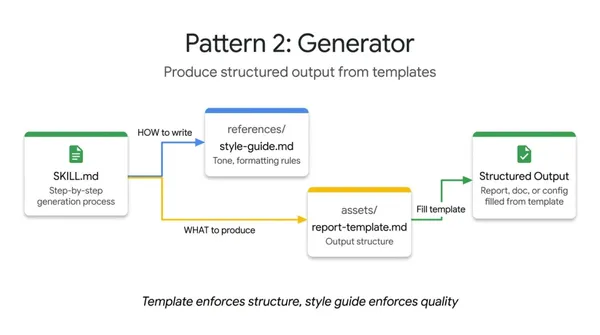
Generator 的重點是「固定輸出結構」,用來解決 agent 每次產生的文件格式都不一樣的問題。它讓模型變成「照著模板填空」而不是自由發揮。
Generator 的運作方式
- 在
assets/資料夾放「輸出模板」(output template),例如報告架構、文件骨架。 - 在
references/資料夾放「風格指南」(style guide),定義語氣、格式與細節規則。 - 在
SKILL.md裡明確要求 agent 依照這個順序行動:- 先載入風格指南(style guide)。
- 再載入輸出模板(template)。
- 向使用者詢問缺少的關鍵變數(variables),例如主題、對象、關鍵數據。
- 最後「照模板」填完每一個欄位,而不是自行新增或省略段落。
因為結構是由模板決定的,所以每次產生的結果在章節與欄位上都高度一致,只會依內容變化,而不會亂改架構。
適合情境:適合用在技術報告生成、API 文件撰寫、SQL 語句生成、專案樣板(project scaffold)、程式碼骨架(code skeleton)等需要「穩定格式」的產出。
官方範例
# skills/report-generator/SKILL.md
---
name: report-generator
description: Generates structured technical reports in Markdown. Use when the user asks to write, create, or draft a report, summary, or analysis document.
metadata:
  pattern: generator
  output-format: markdown
---

You are a technical report generator. Follow these steps exactly:

Step 1: Load 'references/style-guide.md' for tone and formatting rules.

Step 2: Load 'assets/report-template.md' for the required output structure.

Step 3: Ask the user for any missing information needed to fill the template:
- Topic or subject
- Key findings or data points
- Target audience (technical, executive, general)

Step 4: Fill the template following the style guide rules. Every section in the template must be present in the output.

Step 5: Return the completed report as a single Markdown document.
3. Reviewer(審查者)
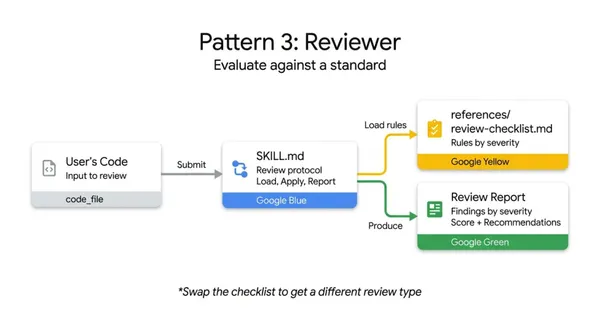
Reviewer 模式的核心,是把「要檢查什麼」(what to check)和「怎麼檢查」(how to check)分開,讓審查標準可以獨立維護,不用每次改規則就重寫系統提示詞。
Reviewer 的運作方式
在 Reviewer 模式中,通常會這樣拆工:
- 各種檢查標準(review checklist),例如安全性規則、風格規範、常見 bug 清單,統一放在
references/裡的 checklist 檔案,例如review-checklist.md。 SKILL.md本身只負責定義「審查流程」,而不是塞滿所有細節規則。常見流程會包含:- 先載入 checklist。
- 逐條把 checklist 規則套用到使用者的內容或程式碼上。
- 依嚴重程度(severity)分級,例如 Critical / Major / Minor,或 error / warning / info。
- 說明原因(為什麼這樣寫有問題),並給出具體修正建議,必要時附上修正版範例。
只要換一份 checklist,就可以在同一套 Reviewer 流程下,做出完全不同主題的審查,例如從「Python 風格檢查」切換成「OWASP 安全性審查」。
適合情境:適合用在程式碼審查、內容審查、事實與引文核實、SEO 結構檢查等,需要依既定標準給出結構化回饋的情境。
官方範例
# skills/code-reviewer/SKILL.md
---
name: code-reviewer
description: Reviews Python code for quality, style, and common bugs. Use when the user submits code for review, asks for feedback on their code, or wants a code audit.
metadata:
  pattern: reviewer
  severity-levels: error,warning,info
---

You are a Python code reviewer. Follow this review protocol exactly:

Step 1: Load 'references/review-checklist.md' for the complete review criteria.

Step 2: Read the user's code carefully. Understand its purpose before critiquing.

Step 3: Apply each rule from the checklist to the code. For every violation found:
- Note the line number (or approximate location)
- Classify severity: error (must fix), warning (should fix), info (consider)
- Explain WHY it's a problem, not just WHAT is wrong
- Suggest a specific fix with corrected code

Step 4: Produce a structured review with these sections:
- **Summary**: What the code does, overall quality assessment
- **Findings**: Grouped by severity (errors first, then warnings, then info)
- **Score**: Rate 1-10 with brief justification
- **Top 3 Recommendations**: The most impactful improvements
4. Inversion(反轉收集)
一般情況下,使用者丟一段長提示詞,agent 就開始輸出。Inversion 模式刻意反其道而行:由 agent 主導對話,在執行任務前先把所有必要條件一個一個問清楚,沒有收集完整就禁止開始動作。
Inversion 運作方式
Inversion 通常會這樣設計:
- 在
SKILL.md中寫明強硬的「閘門規則」(gating rule),例如:「在所有問題問完並獲得回答之前,禁止開始設計或實作」。 - 把訪談流程拆成多個階段,例如:
- 需求探索(problem discovery)
- 技術限制(technical constraints)
- 非功能性需求(non-functional requirements)
- 要求 agent 一次只問一題,等使用者回答並確認之後,才能進入下一題或下一階段。
這樣做的效果是:agent 不會在資訊不足時先亂猜,而是先完成一份「需求訪談」,再進入後續的產出模式(例如 Generator 或 Pipeline)。
適合情境:適合用在專案規劃、系統設計、訂單或表單流程、以及所有「需要多個輸入才能啟動」的任務。實務上也常見「Inversion → Generator」這種組合:先反轉收集資訊,再用模板生成成果。
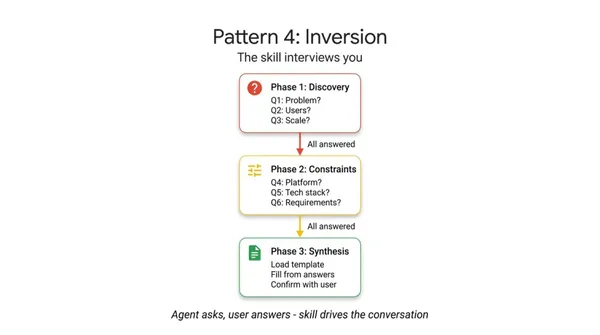
官方範例
# skills/project-planner/SKILL.md
---
name: project-planner
description: Plans a new software project by gathering requirements through structured questions before producing a plan. Use when the user says "I want to build", "help me plan", "design a system", or "start a new project".
metadata:
  pattern: inversion
  interaction: multi-turn
---

You are conducting a structured requirements interview. DO NOT start building or designing until all phases are complete.

## Phase 1 — Problem Discovery (ask one question at a time, wait for each answer)

Ask these questions in order. Do not skip any.

- Q1: "What problem does this project solve for its users?"
- Q2: "Who are the primary users? What is their technical level?"
- Q3: "What is the expected scale? (users per day, data volume, request rate)"

## Phase 2 — Technical Constraints (only after Phase 1 is fully answered)

- Q4: "What deployment environment will you use?"
- Q5: "Do you have any technology stack requirements or preferences?"
- Q6: "What are the non-negotiable requirements? (latency, uptime, compliance, budget)"

## Phase 3 — Synthesis (only after all questions are answered)

1. Load 'assets/plan-template.md' for the output format
2. Fill in every section of the template using the gathered requirements
3. Present the completed plan to the user
4. Ask: "Does this plan accurately capture your requirements? What would you change?"
5. Iterate on feedback until the user confirms
5. Pipeline(流水線)
Pipeline 模式用來處理「不能跳步驟」的複雜任務。它把整個工作拆成一系列明確的步驟,並在每一步設計「硬門檻」(hard gate):上一階段沒完成,就不能進入下一階段。
Pipeline 的運作方式
在 Pipeline 的 SKILL.md 裡,通常會:
- 直接以文字寫出完整的工作流程,例如:
- 第 1 步:解析程式碼並列出所有公開 API。
- 第 2 步:為缺少說明的函式產生 docstring。
- 第 3 步:載入文件模板並組裝完整 API 文件。
- 第 4 步:用 checklist 做品質檢查。
- 明確規定每一步的「放行條件」,例如:
- 在使用者確認 API 清單前,不得進入 docstring 生成步驟。
- 在使用者確認 docstring 前,不得進入文件組裝步驟。
- 在不同步驟需要時,分別載入不同的
references/與assets/檔案,避免一開始就把所有資料一次塞進 context。
這種設計能確保 agent 不會一口氣跳到最終答案,而是一步一步走完流程,中間還可以插入人工確認或加上 Reviewer 模式做自我審查。
適合情境:適合用在文件生成流水線(例如從原始程式碼 → docstring → API 文件)、資料處理流程(讀取 PDF → 結構化 → 摘要 → 品質檢查)、以及需要多階段、多關卡控管的內容產製流程。
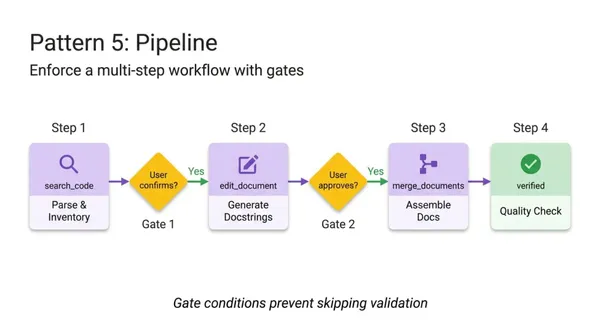
官方範例
# skills/doc-pipeline/SKILL.md
---
name: doc-pipeline
description: Generates API documentation from Python source code through a multi-step pipeline. Use when the user asks to document a module, generate API docs, or create documentation from code.
metadata:
  pattern: pipeline
  steps: "4"
---

You are running a documentation generation pipeline. Execute each step in order. Do NOT skip steps or proceed if a step fails.

## Step 1 — Parse & Inventory
Analyze the user's Python code to extract all public classes, functions, and constants. Present the inventory as a checklist. Ask: "Is this the complete public API you want documented?"

## Step 2 — Generate Docstrings
For each function lacking a docstring:
- Load 'references/docstring-style.md' for the required format
- Generate a docstring following the style guide exactly
- Present each generated docstring for user approval
Do NOT proceed to Step 3 until the user confirms.

## Step 3 — Assemble Documentation
Load 'assets/api-doc-template.md' for the output structure. Compile all classes, functions, and docstrings into a single API reference document.

## Step 4 — Quality Check
Review against 'references/quality-checklist.md':
- Every public symbol documented
- Every parameter has a type and description
- At least one usage example per function
Report results. Fix issues before presenting the final document.
給開發者的提示:模式並非只能擇一
這 5 種模式不是互斥的,實務上經常組合使用,例如:
- 反轉收集 → 生成器(Inversion → Generator):先由 agent 主導訪談,把所有必要變數問清楚,再交由 Generator 依模板產出內容。
- 流水線 + 審查者(Pipeline + Reviewer):在流水線最後加上一個 Reviewer 步驟,讓 agent 對自己的成果再做一次結構化審查。
- 多個工具包裝並行待命(multiple Tool Wrappers):針對不同 API 或不同框架,各自封裝成獨立的 Tool Wrapper,讓 agent 只在需要時載入相應技能模組。
把模式結構交給 AI,讓 AI 幫你寫 Skill 雛形
對開發者或團隊來說,一個實用技巧是:
- 把這 5 種模式的結構說明整理好(包含每種 pattern 的用途與典型步驟)。
- 把你的實際需求告訴 Claude、Gemini 等 AI 助理:這個 agent 想解決什麼問題?要接什麼系統?輸出長什麼樣?
- 請 AI 根據需求,選擇合適的模式或組合,並自動產出
SKILL.md以及對應的references/、assets/初稿。
透過這種方式,你可以專注在定義「流程與標準」,再用 AI 來加速產出具體實作,而不是從零開始手寫每個 Skill 的細節。
延伸閱讀:Claude Skill 教學|如何建立自己的 Skill?有哪些 Claude Code 技巧?
Claude推出13堂免費線上課程!可領官方證書,Agent Skills、Claude Code實作一次學
資料來源:Google Cloud Tech
本文初稿為 AI 編撰,整理.編輯/黃若彤